
Category: Technology
Social Security denies disability benefits based on list with jobs from 1977
I got a comment I want to answer on the post I made about this. I used The Washington Post article but when I went to reread it I no longer had access to the article. So I found another report on what the Social Security hearings are like. I have been through them. The report is telling the truth. It is ridiculous the way they try to prevent disabled people from getting much needed government assistance. Hugs
Story by Lisa Rein •8mo

Social Security denies disability benefits based on list with jobs from 1977© Bettman Archive
He had made it through four years of denials and appeals, and Robert Heard was finally before a Social Security judge who would decide whether he qualified for disability benefits. Two debilitating strokes had left the 47-year-old electrician with halting speech, an enlarged heart and violent tremors.
There was just one final step: A vocational expert hired by the Social Security Administration had to tell the judge if there was any work Heard could still do despite his condition. Heard was stunned as the expert canvassed his computer and announced his findings: He could find work as a nut sorter, a dowel inspector or an egg processor — jobs that virtually no longer exist in the United States.

Nut sorter job description from Dictionary of Occupational Titles
“Whatever it is that does those things, machines do it now,” said Heard, who lives on food stamps and a small stipend from his parents in a subsidized apartment in Tullahoma, Tenn. “Honestly, if they could see my shaking, they would see I couldn’t sort any nuts. I’d spill them all over the floor.”
How a Social Security program piled huge fines on the poor and disabledHe was still hopeful the administrative law judge hearing his claim for $1,300 to $1,700 per month in benefits had understood his limitations.
But while the judge agreed that Heard had multiple, severe impairments, he denied him benefits, writing that he had “job opportunities” in three occupations that are nearly obsolete and agreeing with the expert’s dubious claim that 130,000 positions were still available sorting nuts, inspecting dowels and processing eggs.

Laura Parsons of Fortescue, N.J., who has a connective tissue disorder known as Ehlers Danlos Syndrome, was denied disability benefits based on outdated jobs she was told she could do. Her appeal is pending.© Mark Makela for The Washington Post
Every year, thousands of claimants like Heard find themselves blocked at this crucial last step in the arduous process of applying for disability benefits, thanks to labor market data that was last updated 45 years ago.
The jobs are spelled out in an exhaustive publication known as the Dictionary of Occupational Titles. The vast majority of the 12,700 entries were last updated in 1977. The Department of Labor, which originally compiled the index, abandoned it 31 years ago in a sign of the economy’s shift from blue-collar manufacturing to information and services.
Social Security, though, still relies on it at the final stage when a claim is reviewed. The government, using strict vocational rules, assesses someone’s capacity to work and if jobs exist “in significant numbers” that they could still do. The dictionary remains the backbone of a $200 billion disability system that provides benefits to 15 million people.
It lists 137 unskilled, sedentary jobs — jobs that most closely match the skills and limitations of those who apply for disability benefits. But in reality, most of these occupations were offshored, outsourced, and shifted to skilled work decades ago. Many have disappeared altogether.

Workers shell pecans in a union plant in San Antonio in 1939. Nut sorting is among the jobs in a Labor Department publication that Social Security relies on to decide disability benefits, even though most of the sedentary, unskilled jobs it lists have been automated.© Corbis via Getty Images
Since the 1990s, Social Security officials have deliberated over how to revise the list of occupations to reflect jobs that actually exist in the modern economy, according to audits and interviews. For the last 14 years, the agency has promised courts, claimants, government watchdogs and Congress that a new, state-of-the-art system representing the characteristics of modern work would soon be available to improve the quality of its 2 million disability decisions per year.
But after spending at least $250 million since 2012 to build a directory of 21st century jobs, an internal fact sheet shows, Social Security is not using it, leaving antiquated vocational rules in place to determine whether disabled claimants win or lose. Social Security has estimated that the project’s initial cost will reach about $300 million, audits show.
Social Security offices critical to disability benefits hit breaking point“It’s a great injustice to these people,” said Kevin Liebkemann, a New Jersey attorney who trains disability attorneys and has written extensively on Social Security’s use of vocational data. “We’re relying on job information from the 1970s to say thumbs-up or thumbs-down to people who desperately need benefits. It’s horrifying.”
Obsolete jobs
In 2022, it is not easy to find a nut sorter (code 521.687-086) in the national economy who “observes nut meats” on a conveyor belt and picks out broken, shriveled, or wormy nuts. How many workers in America inspect dowel pins (code 669.687-014), searching for flaws from square ends to splits, then discard them by hand? And even if Heard were qualified to remove virus-bearing fluid from fertile chicken eggs for use in vaccines by sawing off the end of an egg and removing its fetal membrane, that work is largely automated today.
The Bureau of Labor Statistics, which is part of the Labor Department, has built a new, interactive system for Social Security using a national sample of 60,000 employers and 440 occupations covering 95 percent of the economy. But Social Security still has not instructed its staff to use it.

Very few jobs still exist for manual scoreboard operators, but they remain on the list of unskilled, sedentary jobs that Social Security considers in disability claims.© Brian Bahr/Getty Images
“They regularly tell us they plan on using the data,” Hilery Simpson, the labor bureau’s associate commissioner for compensation and working conditions, said of Social Security officials. The data collection and estimation “have gone through extensive testing and use the best-in-class statistical methods,” he said. The survey is available to the public on the labor bureau’s website.
Social Security has not explained why it has yet to implement the labor bureau survey.
Acting Social Security commissioner Kilolo Kijakazi declined to be interviewed. In a statement, she said, “To date, the best available source for occupational information has been the Dictionary of Occupational Titles. We have enlisted vocational experts to provide more detailed and current information about the jobs available in the national economy, while we continue to work on creating our own occupational data source informed by [the Bureau of Labor Statistics] that best reflects the current job market.”
A spokeswoman for the agency declined to answer questions about a timeline for putting the modern data into use.
Social Security’s delays in updating the database of job titles are rooted in conflicting political considerations, shifting leadership, and the drift that can bedevil large federal projects, according to current and former officials, auditors and disability advocates.
A modern list of occupations would create new winners and losers in the application process — posing political sensitivities for a program that has long drawn judgment that the government is either too generous or not generous enough. Over two decades, Social Security has been led by six acting commissioners and just three Senate-confirmed leaders, leaving power vacuums at the top that can delay costly projects. Many advocates believe the agency is motivated to delay the project so it can deny more claimants benefits.
“The scandal is that everybody wants this data discussed in terms of who will be hurt and who will be helped,” said David Weaver, a former Social Security associate commissioner who helped lead the early effort to modernize. “But a lot of money has been spent. You have the gold-standard of federal data, and Social Security is not producing anything.”

Social Security denies disability benefits based on list with jobs from 1977© Provided by The Washington Post
Congress continues to approve more than $30 million per year for the survey of modern jobs without asking hard questions about why the data sits unused, congressional aides and former Social Security officials said.
Senate Finance Committee Chairman Ron Wyden (D-Ore.) called on Social Security to move forward.
“Occupational definitions used by the federal government need to reflect the reality of the work Americans are doing today,” Wyden said in a statement. He warned that data on modern jobs “must be handled with care to ensure that nobody is wrongly denied their earned benefits.”
Federal courts, meanwhile, keep sending denied claims back to Social Security to redo its decisions, raising alarms that the government is shortchanging disabled Americans with arbitrary judgments that put it at legal risk.
“Does anyone use a typewriter anymore?” Richard Posner, a judge for the U.S. Court of Appeals for the 7th Circuit, asked in a 2015 decision reversing an administrative law judge’s denial of benefits to a disabled man the judge claimed could work as an “addresser” — one who “addresses cards” by hand or typewriter. Posner called a vocational expert’s claim that 200,000 such jobs still exist today a “fabrication.”

Addresser job description from Dictionary of Occupational Titles© TWP/TWP
Others have not been as fortunate. Few claimants without attorneys are aware that the jobs used to deny them benefits have been pulled from obscurity. And many lawyers representing them lack the expertise and resources to take a case to federal court, say advocates, vocational experts and judges who rule in these cases.
“Every day we made decisions we don’t necessarily agree with,” said George Gaffaney, an administrative law judge in the Chicago area. “It’s troubling.”
A need to modernize
The Dictionary of Occupational Titles was first published in 1938 to help a country pulling out of the Great Depression match workers with jobs. Each entry contained the time to train for the job, the aptitude required, physical demands, the work performed — but not any recognition of which jobs match with the cognitive impairments common among the disabled today.
With its benefit decisions hinging largely on whether someone’s impairment limits them from doing past jobs or other jobs, Social Security needed a resource with accurate information about available work. But by the time the Labor Department retired the red hardcover book three decades ago, it was already stocked with jobs that, if not already gone, were quickly vanishing from the economy: elevator operators, thaw-shed heater tenders, window shade ring sewers. And it did not include a host of emerging information-economy jobs, from web designers to employment recruiters.
Pandemic struggles still afflict Social Security, a last lifeline for many
Inside Social Security, the publication’s 1991 demise set off a decade of hand-wringing. Workgroups, panels and committees of experts formed — all while the agency continued to rely on the outdated jobs list. By 1998, the Labor Department had developed a new database of jobs and what was required to do them. Social Security brought in another round of experts to determine whether that system, dubbed O*NET, could serve its disability program.
It took until 2008 — a full decade — to reach consensus: the agency needed to develop its own vocational information because existing federal data lacked enough characteristics of jobs disabled people could do. So in 2012 Social Security signed a contract with the Bureau of Labor Statistics to design a modern system that would help make accurate disability determinations.

A closed gun retailer’s records are photographed for duplication to microfilm at the ATF National Tracing Center on June 23, 2010, in Martinsburg, W.Va. Few document preparers are left in the U.S.© The Washington Post
The same year, the Government Accountability Office began questioning the project’s cost estimates and schedule. After three years of tests, field economists began their surveys in 2015. When that data was delayed, government watchdogs began warning that the project was in danger of becoming a case study in the challenges of large federal investments.
In 2018, the agency’s inspector general wrote in an audit, “It remains crucial that [Social Security] leadership commit to ensuring appeal applications receive fair and consistent treatment.” In response, a Social Security official set a target of fiscal 2020 to put the modern data into use and wrote, “we continue to work diligently to avoid delays in its implementation.”
The labor bureau now says it will finish a second wave of data collection next year. A third is planned.
“We thought we could do it in 10 years. It might take 20 years,” said Byron Haskins, who worked on the project as a branch chief from 2010 to 2016. “In the meantime, we’re not standing on solid ground on these decisions.”
When New York art collector and apparel company investor Andrew Saul was confirmed as President Donald Trump’s Social Security administrator in June 2019, his team drew up plans to start using the modern jobs data, concluding that disabled people, particularly older Americans, could learn new skills in an economy with more sedentary, skilled jobs. The new survey could tighten eligibility for benefits, Saul believed — a White House priority.
“It was going to make the system fairer,” Saul said in an interview. “People who deserved disability would get it, and those who didn’t would not.”
But the plan set off a furor among advocates, who opposed a provision that would have made it harder for older workers to qualify for benefits. The Biden administration quickly shelved it and the president fired Saul in 2021.
Old data
Even so, advocates and opponents agree on one thing: A disability system that relies on obsolete jobs to decide claims is gambling with taxpayers and with the courts.
“It’s never really been blessed by Social Security,” said David Camp, president of the National Organization of Social Security Claimants’ Representatives, reflecting the view of many advocates. “The agency won’t take the step to clean up the system because they know we’ll win more cases.”

A worker inspects pistachio nuts for quality control at the IberoPistacho S.L.U. farm and processing plant in Manzanares, Spain. The job is now often automated, but Social Security experts frequently cite it to disability claimants as work they can find in the modern economy.© Manaure Quintero/Bloomberg News
Mark Warshawsky, deputy commissioner for retirement and disability policy under Saul, described the antiquated vocational policy as “an arbitrary system.”
“How hard is it for the federal government to make change?” he asked. “That’s not a political thing. Spending almost $300 million with nothing to show for it is embarrassing.”
The current system is leading thousands of disability claims per year to be denied that would otherwise have a good chance of approval, data suggests. The inspector general’s 2018 audit showed that from fiscal 2013 through 2017, occupational information was used to decide more than half of all initial claims and in four in five decisions at the hearing level when decisions are appealed. The data does not show if it was the deciding factor.
But a 2011 study commissioned by Social Security found the 11 jobs most commonly cited by disability examiners when denying benefits. The top job was addresser, used in almost 10 percent of denials. Twelve years later, little has changed, advocates say.
Estimates by Social Security’s experts of how many of these outdated jobs remain in the economy are also widely off the mark, courts have found.
The U.S. Supreme Court held in 2019 that Social Security judges could uphold agency decisions even when vocational experts refuse to provide data on how they come up with job numbers. But the decision led to a blistering dissent from Justice Neil M. Gorsuch, who cited dubious expert claims that 120,000 “sorter” and 240,000 “bench assembler” jobs are available to the disabled without clear evidence.
Earlier this year, the U.S. Court of Appeals for the 7th Circuit noted a similar problem while overturning a Social Security judge’s denial of benefits to a Wisconsin man.
“All three judges on this panel, assisted by very talented law clerks, read the transcript of the [vocational expert’s] testimony multiple times,” the court wrote. “And yet nobody can explain with coherence or confidence what the [vocational expert] did to arrive at her job-numbers estimate. … There has to be a better way.”
The expert claims can be equally baffling to claimants.
At his hearing before an administrative law judge in Pennsauken, N.J., in July 2019, Sean Dooley described the chronic pain and limited stamina from diabetes, thyroid issues and degenerative disk disease that had kept him from working as a jewelry salesman for three years.

Sean Dooley suffers from diabetes, thyroid issues and degenerative disk disease. His claim for disability benefits was denied on the basis of vocational testimony that he could work as an order clerk, addresser or call-out operator. A federal court remanded his appeal to Social Security for a new hearing. He lives in his sister’s garage in Pennsville, N.J.,© Mark Makela for The Washington Post
His mother testified that at 400 pounds, her son struggled to sit, stand, bend over and lift. Yet a vocational expert said Dooley could work as an order clerk, an addresser or a call-out operator — a job he had never heard of. An expert whose software is used by many vocational experts has calculated that 2,000 addressers are left in the U.S., 2,060 call-out operators who compile credit information and 424 order clerks.
In a written decision three months later, Judge Lisa Hibner Olson denied Dooley benefits, overruling his lawyer’s arguments that the jobs were obsolete.
“It was like I’m hit with a torpedo,” recalled Dooley, 46, who is living on his mother’s meager retirement savings in his sister’s garage in Pennsville, N.J. “With these goofy jobs, there was no way they were ever going to approve me. If I could work, I would be working.”
Dooley’s denial was overturned by a U.S. district court and remanded to the same Social Security judge, who has scheduled a new hearing for January.
The problem is not limited to appeals heard before judges. State offices that first decide disability claims place blame for a historic backlog exceeding 1 million cases in part on the obsolete jobs system, which requires expertise most do not have.
“We’ve heard the message from Social Security, ‘We’re working on vocational policy changes,’ for 10 years,” said Jacki Russell, director of Disability Determination Services in North Carolina and president of the National Council of Disability Determination Directors. “ ‘It’s very sensitive,’ they say. Meanwhile, we’re over here trying to make the best decisions we can with a massive backlog.” Russell’s office of 600 employees has just two vocational experts.
In Maryland last spring, Larry Underwood quit in despair after 25 years testifying for Social Security as a vocational expert. He had concluded that there was no valid method to determine what work a disabled claimant could still do, and that it was impossible to project jobs in that field.
“I realized that a lot of vocational experts, including myself, have been giving false testimony for years,” Underwood said. “The numbers are not accurate. I decided I can’t do that anymore.”
A few advocates with expertise in vocational evidence have begun training disability attorneys, warning that if they aren’t savvy enough to rebut the job claims, they will lose.

Laura Parsons was told by a vocational expert at a hearing before a Social Security judge that she could find a job hand-addressing envelopes or preparing documents for microfilming. The judge denied her claim for benefits.© Mark Makela for The Washington Post
Laura Parsons — a former medical assistant from Fortescue, N.J., with a connective tissue disorder known as Ehlers Danlos syndrome — saw that problem firsthand at her hearing in April 2021, in which a vocational expert testified that she could get jobs as an addresser or document preparer. The judge ended the hearing without allowing Parsons to testify.
“They want me to get a job addressing envelopes that doesn’t exist anymore,” Parsons said.
Social Security plans to ask the labor bureau to refresh its occupational information every five years. The next wave is scheduled to start in 2023 at a cost of $167 million, auditors found. Congressional staff have not been briefed on the project in at least three years, aides said. It is not clear if they have asked for a briefing. Meanwhile, courts continue to overturn denials based on the old data — even pleading with Social Security to modernize its system.
“It’s not our place to prescribe a way forward,” the Court of Appeals concluded in the case of the Wisconsin man who had been denied benefits. “Perhaps the Commissioner will read this opinion as an invitation to bring long-awaited and much-needed improvement to this aspect of administrative disability determination.”
Trae Crowder guides us through the pride points, failures, and contradictions in “Southin’ Off.”
Stupid, stupid, idiot, I wish I could still get angry at my own stupidity.
I screwed up! Yes, let me say it again louder, I screwed up! What is worse I started this post late last night not having done all the crap I got early this morning and have been working all day with only a few minutes ago finding and fixing the problem that started this that had I had half the brain I had decades ago or even the eyesight I use to have I might have spotted it right away.
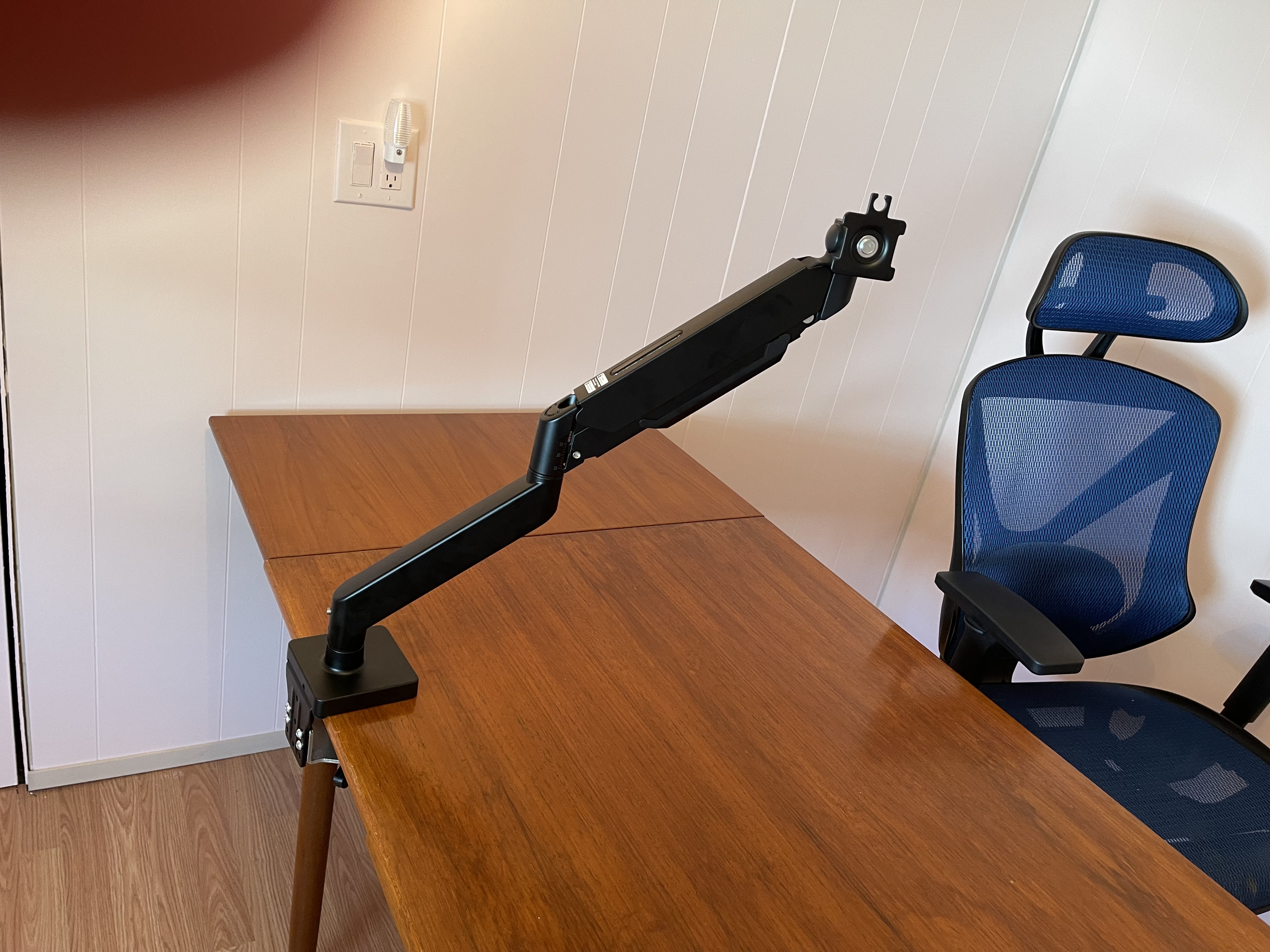
Please indulge me this might get really long as it started yesterday at about 4 or 5 PM. Also as Nan can loudly attest I am never short of words but use as many as possible to say what I want. The saga started at with Ron being unable to sit and watch his TV shows including his apple box, Netflix, HBO Max, Amazon Prime, and a subscription to an oriental video channel he loves. But he gets like that … often. So he decided we had to get out the two new monitor arms we bought for when we moved me into the new room … hold on don’t get ahead of me I got a lot of stupids to go through first. He wanted to set one up and that went to wanting to try them on a monitor.
Well the instructions, which I had a real issue with Ron even bothering to look at as he is sure he understands these things, said first we had to put together the base and then to attach it to the desk, forward from there including putting a monitor on the arm which was what Ron really wanted to do. Well I could see where this was going so … I started shutting things down and getting read to unhook everything.
So Ron was all excited, and he thought it was a great time to clean off the desk and move it into the new office, even though he was not finished working in there. So why fight the inevitable that will happen? I agreed.
So after I unhooked everything Ron helped me remove everything from heavy from the desk and I removed the papers and other small stuff scattered all over the desk. The Ron cleaned and washed the desk of all the dust, dirt, food, and cat food pieces that gather on a place where I let cats stay and so much daily work is done.
One thing, I have said and will say many more times that “Ron cleaned …” . And that is because Ron doesn’t mind cleaning stuff, doing the detailed work of getting cat fur and other debris off stuff. I hate it, and Ron understands this. I will wash dishes now that we don’t have the dishwasher, I will clean toilets and showers, I will do the floors until my torn up dying shoulders give out. But detailed cat hair / fur removal and other stuff like that I hate including cleaning, dusting, and wiping stuff down. I have not done it so far in my 60 years except a few years in the military, and if I can keep my wonderful hubby happy I won’t have to.
So I guess now I have to explain what my desk is. In 1998 we bought another new home because Ron insisted for the many times again we move … I now understand why, but then we did not have a diagnosis of his anxiety issues. That would come many decades and a lot of lost money later. The prior owner was selling everything in the house including a wooden table with the ability to expand to about 84 inches and was 31 1/2 wide. I loved it. The owner wanted 100 dollars for it and we paid that. There is a further story about the table, but everything worked out for us after my adoptive father tried to screw me, again.
Long story short, after all the damage to the home and my office from hurricane Ian my desk in my office was destroyed and to get my computer system up online the guys took the eating table we had so they could quickly get me set up. But after using it for a while and having very … large Odie sprawled on it, we realized it was so much better for that than my other desks. It was decided not to buy another desk but I would keep this table as my desk. Fast forward to last night … again.
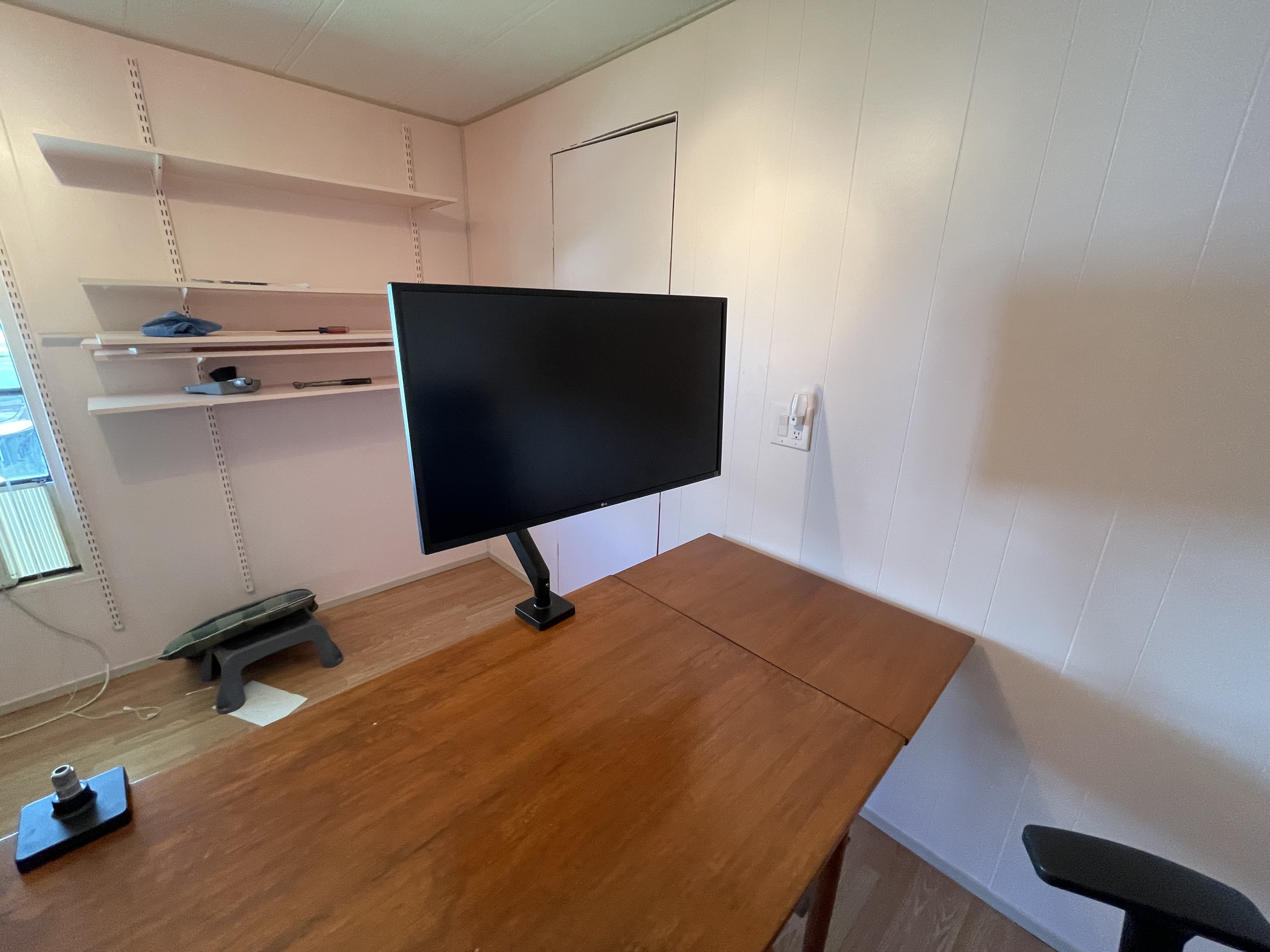
Last night we cleaned off the desk, removed the middle top, took it into the room and expanded it and put the top back in. Remember this was a sudden decision due to Ron not being able to settle down and wanting to see how the new monitor arms worked, Then we added the arms that we put together haltingly and without any missteps. Added the monitors and adjusted the arms so I could move them. Ron still needs to loosen then some more so it is easier for me to move, right now I have to get up and use a lot of effort to move them. When I told him he was agreeable but said he was only trying to keep the monitors from falling, but remember the arms we bought are for monitors larger and heavy than mine as Ron thinks I might want / need bigger ones in the future. My eyes are still getting worse.
Then after the monitors it was time to put the computers he wiped off and cleaned but that also became a small issue. When I was in this room as my office originally I had each computer up off the floor which keeps them much cleaner and healthier. In the old large front room office Ron was always going to build something to get them off the floor but never did find time to do it, and in that room and the living room my computers sat on the floor. One on each side of the desk, on the side of their monitor. This important as you will see later. The important thing to know is the side of each monitor changed. They are reversed.
With the Logitech program and devices I have I can switch computers with just moving the mouse to the edge of the computer screen and it switches to the other computers. So blogging computer is always computer one and video computer is always computer two with any laptop or other thing I am working on being number three. On the keyboard I use number three for my phone so I can text easier. I never had an issue with changing my set-up before. What I did not realize is they changed the program so simply resetting the flow settings did not change the computer arrangement to match the current set up. That is important as you will see and how I totally became stupid and caused my self two days of extra work.
So we set up monitors, computers on the desk moving their position to better salve my OCD about size and placements, we put the battery backups on the floor, ran the new power cables and plugged stuff in, and started to hook the other stuff up. Then came the last part, the ethernet cables. We had not moved the modem or router so the cat cables I was using before were too short. I dug boxes out of my closet of older cables and stuff. I found a few that are more than long enough and ran them along the walls and into the room to the computers. But they are not cat 6 such as the ones I was using, so when everything gets put into the room I will take the measurements of the lengths I need and order them at that time.
I should mention that somewhere at this point Friday night I still did not know what was keeping my mouse and keyboard from switching / working properly as I had written about so much of this much of this post. I closed it down to go to bed at like 9:15 PM which is very late for me only to find that this morning I had lost the entire post. I had not yet dumped either computer which I was planning to do and then reinstall all the programs hoping that cleaned up what every was keeping the issue. Remember the point is to move the mouse to the edge of the monitor and the cursor jumps to the next monitor. To be continued tomorrow morning.
Writting this on Sunday morning!
So Saturday morning I got up early and wanted to dump the computers because I was still sure the problem was a registry issue. So instead of just running the registry cleaners I thought to dump them, that way cleaning them up really well. But I had a major problem. I still had 61 open tabs saved for comments and websites I want to get to. If I dumped both computers I would forever lose them. So I was stuck doing them one at a time dragging the process out and maybe keeping the same issue with the mouse / keyboard program switching monitors / computers. I decided to do the video computer first.
I had done all the prep work yesterday so all I had to do Saturday morning was to run the recovery program telling the computer to clean all the drives and redownload and install the Windows 10 OS. Then after about 20 minutes or less I started the tedious work of going through and adjusting all the settings, renaming the computers, setting things up to give me the max privacy and performance mix. That takes far longer than doing the recovery. Then I started with the programs reinstall. I do Chrome first, then Nortons security and utilities, then NordVPN, and lastly I install Ashampoo Winoptimizer 26. I set all of them to give the max security and max privacy. Also Both NordVPN and Adblock Plus in Chrome stops any advertisements except those I allow. Plus NordVPN and Nortons both work to prevent malware and scan for viruses. Then I add in the sound programs, camera programs and other odds and ends programs I use. That takes hours, but I can still use the computer while doing it.
Next I used the history of devices on Chrome to open all 61 of the saved open tabs that my blogging computer had open. I then did all the recovery steps on the blogging computer that I had just done on the video computer. During this Ron got up so I started up his computer and used it to also load the 61 open tabs so I would be sure not to lose them.
During this time I was checking to see if the newly installed Logi Options+ to see if it seen the computers in the right order and would work by moving the mouse to the left edge of the right screen moving the mouse cursor to the left screen and to go back to the right screen I would move the mouse cursor to the right edge of the left monitor. It wouldn’t switch, still not working. But in frustration I moved the cursor all the way to the right edge of the right monitor and suddenly the cursor showed up on the left monitor. Wait how did that happen. I did a few more times, and it worked like it should. Except to the program the monitors were in the possitions they were before the move. I did not make sence to me. I open the program on both computers and reset the flow part of the program. Same thing. I was getting so frustrated! Then know I needed a break I left my mouse cursor on one of the monitors in the open flow part of the program and went to get a soda.
When I returned I noticed a tip message I never seen or had appear before because I never left the cursor on one of the monitors on the program that names the monitor / computer for each ones connect with the program.
The message said “Drag to rearrange”. WTF
By my dogs that love gravy could it really be that easy? Could it be the solution was to simply move the monitors in the program. Then I looked at the names on the monitors displayed in the program. I had not bothered because I knew both of mine were there so why take the effort to really look closely at the names on the monitors displayed. Son of a deer tick, on the screen the monitors were PlayBlogger on the left and PlayVideo on the right. But I had switched the order in the move. Now the monitor for the PlayBogger was on the right and Play Video on the left. I dragged the displayed monitors in the program to show the current positions of the monitors. Then I moved the cursor to the left edge of the right monitor and it jumped to the left monitor. It worked! Just the way it is supposed to. All that work, and two days lost from blogging and read blogs / news. All because I did not know that I could change the monitors on the screen and I DID NOT LOOK AT WHAT THE DISPLAY SAID THE MONITOR ORDER WAS.
But by the time I figured it out it was far too late in the day and I was very tired. I decided to get a shower and go to bed. Ron had acid reflux again in the early part of the night and was up most of the night. I couldn’t sleep either so we got up about 3:30 AM and while having coffee I am finishing writing this post. Before the morning news shows I have to move my rolling TV entertainment stand into the new office so I can watch the Sunday news shows that are on broadcast. And I have to now go open and save all the last few days of comments and blogs I missed. Hugs







How cruise ships got so big
Cruise ships are freaking big. They’re the biggest passenger vessels humans have ever built. In size and appearance, they look nothing like almost any other boat. So how did they get that way?
The predecessor of today’s cruise ships was the ocean liner: big, beautiful ships that sailed across the Atlantic. But ocean liners had a totally different purpose from cruise ships: They were for transportation. Everything about them was designed to facilitate an ocean voyage from one continent to another.
But air travel changed that. Planes eliminated the main reason to take a ship somewhere, and ocean liner business plummeted. So the industry pivoted and began selling a ship as the destination itself. The cruise ship was born. But the ocean liners, built for a voyage, weren’t ideal for the purposes of a cruise, and over the next few decades, the cruise ship began its evolution. And it has culminated in the behemoths we see today.
The two screens I have been trying to get to
Hello everyone. Here are the screenshots of the stories I want to read and then I have a story to tell everyone. Notice the open tabs. 

But what I really want to talk about it four days ago a woman I have done computer work for in the past. She knew I had pulled back from helping people during Covid but she had hired someone to help and things were worse and now she couldn’t even get online and her computer refused to respond to the keyboard. She said she did not know who to call and I said I would help. I went to her home and I got angry at the story she told me. She was being scammed. A couple years ago during Covid her old computer died and she wanted to just get an inexpensive computer to do her family genealogy hobby and a couple other things, but she really did not spend much time on it. The couple is in their 80s. The computer person sold her a really old poor laptop, A Toshiba Satellite L505D-S5983. I came with windows 7 so the computer person sold her windows 10 at a profit. Then the computer person set the computer up with an anti-virus. I looked up the company and it has a good reputation, but one thing I noticed was the product was sold as a business product so covered a lot of computers in your business setup. I noticed the price was reasonably low for that kind of deal but again the company had good reviews and ratings. When I was telling the woman this she asked me the price and I told her, a little over $33 dollars. From the look on her face I knew something was wrong. The computer person she had bought the computer from who set it up was charging her over $50 dollars for the security software. Also the woman paid a fee to the computer person so that if the computer had an issue the computer person would fix it but again a cost, a reduced cost because of the repair deal but still a cost. Then because of the problems the computer person let slip that they had remote access to the computer and complete control over it. The woman who called me was angry and upset, she did not want this and know what to do. She was being legally scammed which she stopped any business relationship with that computer person because if I couldn’t repair her computer she would replace it or just go without. I explained to her I could reset it and get her functions back while removing the remote control set up the other person had installed. I explain the computer had a small AMD dual core processer so was going to be easily over loaded and that was why after starting the keyboard seemed not to be working because the computer simple need a lot of time to get to the new commands. There was too much happening at start up that was set up by the other computer person and the remote software, plus the security software was set to do complete scans and do updates when the computer started taking all the resources. Yesterday Ron and I got the laptop and accessories she wanted me to fix. Before I connected it to my systems, I backed up the data on the computer to two different separate drives. After making sure it was backed up I reset windows still offline. That took all day yesterday. Then this morning I went through the settings and privacy of the system, and only when I was sure as I could be I connected it to my set up putting it online. I then reset windows from the cloud. The download was quick but the computer is stressing to install windows and is at 26% moving very slowly.
It makes me angry that people think nothing of taking advantage of older people who live in an old mobile home park just trying to have something when everything costs so much these days. I ask why someone would try to milk these people of their very few dollars. I told her I would do my best to take care of their computer needs like I did before Covid. But they have had enough and are selling their home. The hurricane Ian really frightened them. I am investigating if windows defender is a good option for a security system anti-virus software. Hugs
FAA Investigates Near-Miss At Austin Airport [VIDEO]
As you watch the tweet with the altitude and speed of the two aircraft the skill of the FedEx pilot is a lot more impressive once you realize that he had to make sure he did not pull ahead of the passenger plane trying to take off yet also try to gain as much altitude distance between the other plane which also was trying to gain altitude. James works at the airport. When I showed him the video he pointed out to us how the FedEx pilot made sure to not pull in front of the other plane because the backwash from his own engines would have torn the lower plane apart and prevented its ability to take off. James told us that the force coming out of those engines can do damage even 200 feet behind the plane. The airport teaches the workers to be wary of the plane engines because when they wind up they can flip cars and kill people. He said just recently they had a person get caught in just the edge of a plane running up the engines. He said it flipped the person over fifty feet, lucky the man tucked into a ball and let the force roll him. Anyway for having to make a split second decision and make it work out I think the FedEx pilot deserves a huge complement and reward. Hugs
Why we all need subtitles now
Yesterday, all my troubles seemed in the computer array …
Hello and happy holidays to everyone. I hope each of you have had a joyous holiday so far, filled with food and enjoyment. The last time I fixed up the computers I mentioned I had blown out the graphics card. The new card arrived late last week and I put it in. Also the platter 1tb hard drive I used in that computer was chattering bad. Not a good sign. I planned to change it out with another one soon. Well soon happened Christmas day because I may or may not have had a medium risk virus / malware I couldn’t clear that looking back I was attacking the wrong thing.
I ran Norton Power Eraser first thing on both computers. The Video computer was clean, no problems. The Blogging computer had the medium severity virus / malware saying it was in the GeForce …, which is where I screwed up. Because I tired from being up most of the night due to both steroids and both Ron and James setting the house alarm system off. I miss read where the virus was. It was not in the graphics card driver like I assumed. It was on a file to install the automatic GeForce NVidia graphics card drivers. But the driver install and the program install had very similar names and I did not catch the difference.
When I ran the cleaner program it said it couldn’t remove the malware. I Was surprised as it normally uninstalls the malware easily. I uninstalled the driver manually but the computer kept putting it back in when I tried to run the Power Eraser scan. And every scan was telling me that I still had the virus. After about a couple hours I decided to stop monkeying around and just dump the OS (Windows) and change the secondary drive I was using for the data / programs not need to installed on the OS SSD. I did that. Ron put the computer back on the floor and as I am not supposed to get down on the floor or under desks ROn hooked it back up.
That is when I found out I seriously messed up my windows install USB last time I was doing the install / changing drives. I was having an issue with the 1 TB hard drives and switching data / programs where I wanted them. I was getting write protected errors and blocks. I changed the attributes on the drive and files and forced the changes. It was only after that I suspected I was trying to do it to the Window’s install USB, destroying the ability to use it to install Windows OS. Lucky for me I have several others but they were even older versions and would need even more time consuming updating. I worried it was so old that windows would reject it.
When you install windows if you leave the computer connected to the internet the OS program will go to Window’s servers and install an updated copy of the OS program. That saves a lot of time installing, updating, installing more, updating over and over. I have taken to doing that. Yes it is before the anti-malware anti-virus and firewalls are installed but I find it is an acceptable risk. But right after it stops downloading and get to the region / license stage you must disconnect the internet access or Window’s will force you to use your online Microsoft account or set one up to start the computer. I hate that because it informs Microsoft every time you start your computer, plus it use to require a person to keep putting in their password to start the computer. The first time I did the installation I forgot and locked myself in a loop of Windows refusing to let me go further unless I used the Microsoft account. I had to redo the download and start of the install.
Once I got the OS running I installed Norton and ran the power eraser. Still had the malware. But I had not installed the graphics driver so I looked closely at where the malware location was. Damn it, it was on a thumb drive I was storing some of the programs I wanted to install so I wouldn’t have to look each one up. I deleted the file, and told the NPE to fix the problem, and it did. What a lot of extra work because I did not read / understand what the malware was or where it was located.
Well I got everything done and set up by 10:30 last night and went to bed. Hopefully I can do a bit of computer housekeeping and get to answering comments and do a bit of posting. Best wishes and hugs.
 Scottie's Playtime